How to Reduce PDF File Size for Email and Forms
Learn how resolution, image quality and grayscale affect PDF size and readability.
Large PDFs are usually caused by scanned pages, high-resolution photographs or duplicated embedded resources. Text-only PDFs created by office software are often already compact.
Choose a compression method based on the document’s structure. Raster compression is effective for scans but can flatten text, links, forms and signatures.
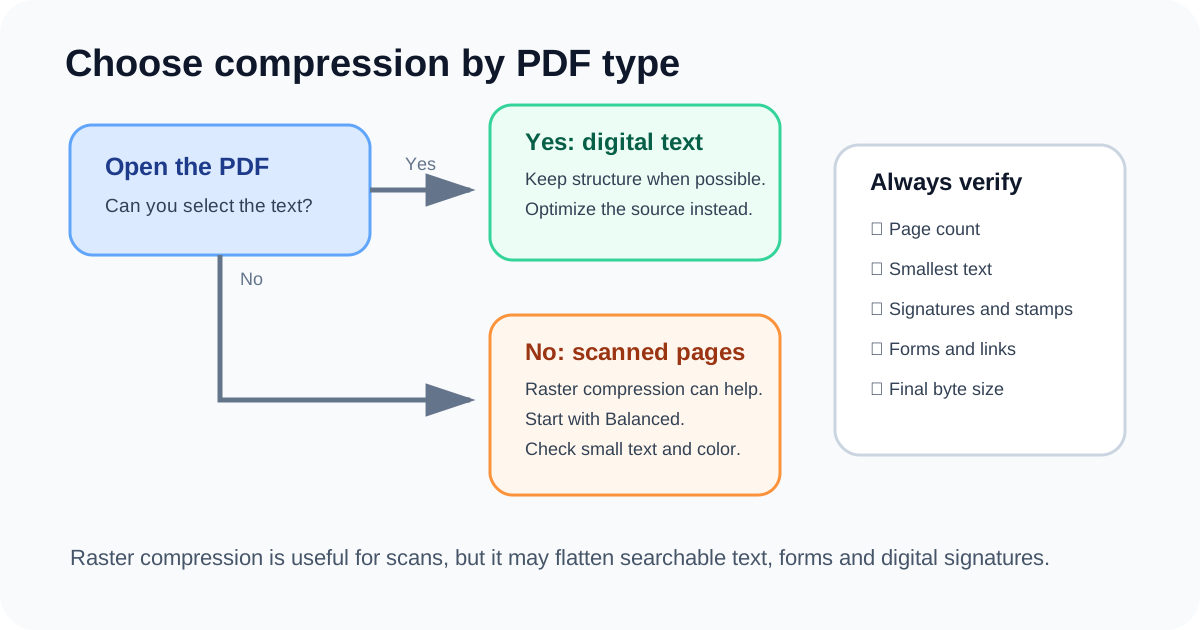
Diagnose the source first
Compare page count and file size. A 2 MB, 100-page text PDF may already be efficient, while a 30 MB, 5-page scan has clear image reduction potential.
Open the file and test whether text is selectable. If it is, raster compression may sacrifice useful structure.
Resolution has a large effect
A page rendered at half the width and height contains one quarter as many pixels. This often saves more space than aggressive JPEG quality reduction.
Use enough resolution for names, dates, stamps, signatures and barcodes.
Use grayscale only when safe
Black-and-white forms can become smaller in grayscale. Colored stamps, highlighted fields, photographs and signatures may lose meaning.
Review every page type, not only the first page, before choosing grayscale.
Preserve originals and functional PDFs
Do not rasterize digitally signed, fillable or accessibility-tagged PDFs when those features are required. Rebuilding can invalidate signatures and remove structure.
Keep the original and label the compressed output clearly as a delivery copy.
Method selection
| PDF type | Recommended action | Risk |
|---|---|---|
| Scanned forms | Raster compression | Text becomes image |
| Photo portfolio | Moderate image compression | Fine detail loss |
| Office text PDF | Keep original or optimize source | Little benefit from rasterization |
| Signed / fillable PDF | Do not rebuild | Signature or form loss |
Final checklist
Check whether text is selectable
Keep the original
Start with Balanced
Inspect smallest text and colors
Verify file size and page count
Questions people ask
Why can a compressed PDF become larger?
The source may already use efficient vector text or compressed images.
Can I target exactly 2 MB?
Not reliably; page content varies.
Does grayscale always save space?
Often for scans, but not enough to justify losing meaningful color.
This article explains the current DocPixel interface and known trade-offs. Requirements from a receiving institution or software provider take priority.