How to Reduce ZIP Size and Why Some Files Do Not Compress
Learn which files compress well and why photos, video and PDFs often stay similar in size.
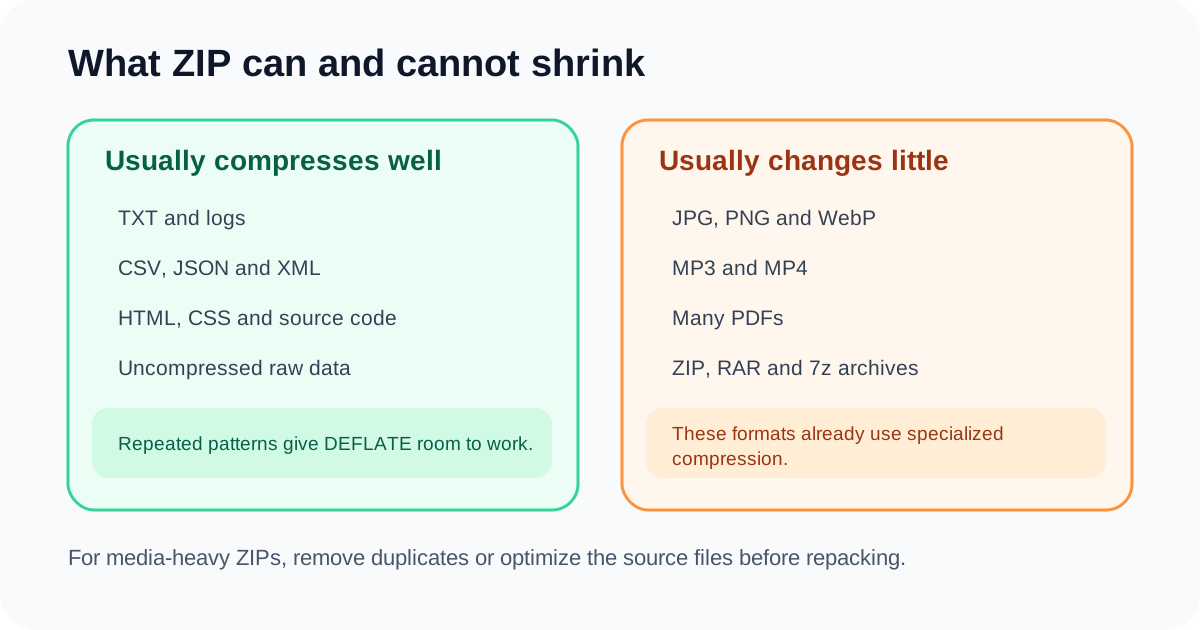
Changing ZIP level from Balanced to Maximum can help text-heavy archives, but it cannot overcome the compression already used inside JPG, MP4, MP3 or many PDFs.
The biggest savings often come from removing unnecessary files or optimizing the source files before repacking.
Find what occupies the archive
An archive dominated by one 100 MB video will not shrink because a few text files compress better. Identify the largest entries and their formats.
Delete obsolete exports, thumbnails, caches and duplicates before changing compression settings.
Understand already-compressed formats
JPG, WebP, MP4, MP3, many PDFs and other archives have already removed repeated data. DEFLATE sees little additional opportunity.
Repacking can even add container overhead and create a slightly larger result.
Optimize source files appropriately
Resize or recompress large photos, reduce scanned PDFs and trim media only when acceptable. Then create a new ZIP.
Keep originals because source optimization can be lossy.
Remove optional system metadata
__MACOSX, .DS_Store and Thumbs.db are often irrelevant to recipients. Removing them reduces clutter and sometimes bytes.
Do not delete unknown project files solely because their names look technical.
Where savings come from
| Action | Potential | Trade-off |
|---|---|---|
| Level 6 → 9 on text | Moderate | More CPU time |
| Remove duplicates | High | Verify they are unnecessary |
| Compress photos first | High | Possible quality loss |
| Repack video archive | Very low | Usually not worth it |
Final checklist
Inspect largest entries
Remove duplicates
Optimize sources
Filter known metadata only
Keep the smaller valid archive
Questions people ask
Why did maximum compression save only 1%?
The contents were probably already compressed.
Can ZIP compression change image quality?
Repacking alone does not; source image compression does.
Should I nest ZIP files?
Usually not, because the inner archive is already compressed.
This article explains the current DocPixel interface and known trade-offs. Requirements from a receiving institution or software provider take priority.